


Search
-
HVAC Equipment
-
Ductless Mini Splits
- Ductless Mini Splits
- Shop By Zone
- Shop by BTU
- Shop By Brand
- Components
- Accessories
-
HVAC Parts & Supplies
- HVAC Parts & Supplies
- HVAC Supplies
- HVAC Tools
-
HVAC Replacement Parts
- Blower Housing & Assemblies
- Blower Wheels
- Breakers, Contactors & Disconnects
- Capacitors & Transformers
- Control & Circuit Boards
- Filter Driers & Accumulators
- Gas Valves & Conversion Kits
- Heat Exchangers
- Thermal Expansion Valves (TXV)
- Temperature Controls
- Wall Brackets & Parts
- Miscellaneous Parts
- O-Rings & Gaskets
- Hydronics
- Motors
- Thermostats & Zoning
-
Plumbing
-
Pool
-
Electrical
-
Air Quality
-
Tools & Supplies
-
Door Security & Hardware


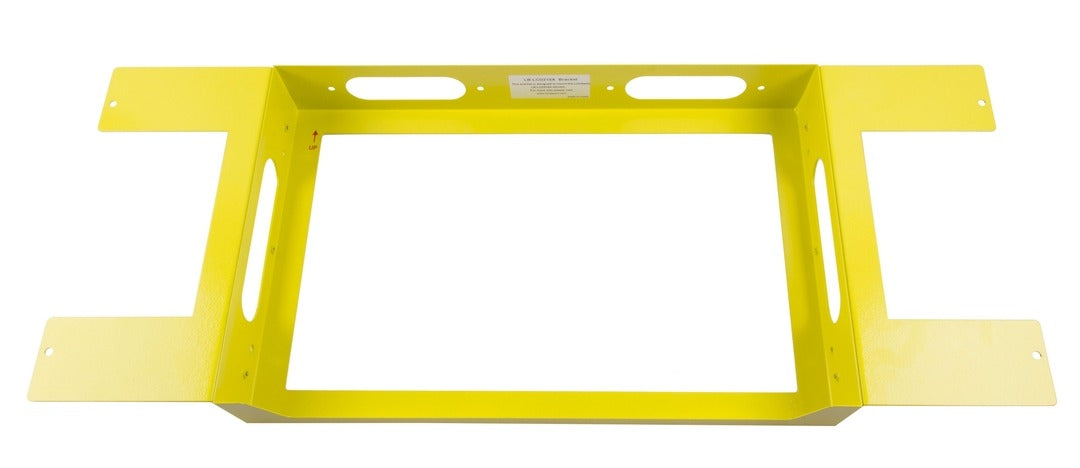
Lionbeam lblcd215a-bkt Pre-installation Bracket
Availability:
In Stock

Ships same day if ordered by 12 pm
- $46.60
- $46.60
- Unit price
- / per
✓
Better Price in Cart
Manufacturer pricing rules prevent us from advertising our discount — no account or email required to see it.
-
Secure Payments
-
Easy Returns
-
Expert Advice
-
Fast Shipping
Product Description
The LIONBEAM lblcd215a-bkt is a pre-installation bracket designed to mark and protect a rough-in opening for the LB-LCD215A flush mount monitor during new construction or remodel work. The bracket spans across two outer wall studs, requiring the installer to cut and remove the middle stud to create the necessary opening. It holds the opening location in place so that drywall contractors and other trades do not cover or inadvertently close the cutout before the monitor is installed. This bracket is a staging and coordination tool used during the framing and rough-in phase of a project, keeping the install site accessible for the final monitor mounting.
This bracket is suited for residential and light commercial wall installations where the LB-LCD215A flush mount monitor is being recessed into a standard stud-framed wall. Because the 21-inch monitor body is wider than a single stud bay, the center stud must be removed to create a multi-bay opening. The bracket mounts to the two remaining outer studs and serves as a placeholder that communicates the opening location to other trades working on the same wall assembly before finish work begins.
Key Features
- Spans three stud bays and mounts to two outer studs to frame a 21-inch monitor rough-in opening
- Requires removal of the center stud to accommodate the LB-LCD215A monitor width
- Protects the rough-in opening from being covered during drywall and finish stages
- Coordinates multi-trade installs by visually marking the flush mount location
- Designed specifically for use with the LIONBEAM LB-LCD215A flush mount monitor
Compatibility
Designed for use with the LIONBEAM LB-LCD215A 21-inch flush mount monitor in standard stud-framed wall construction.
Installation Notes
Installation is typically performed by a low-voltage or AV systems technician during the rough-in phase, before drywall is applied. Power down any circuits running through the affected wall cavity before cutting the center stud. Confirm that the stud being removed is not a structural or load-bearing member before cutting. Local building codes may require a header or structural reinforcement when modifying stud framing, so verify with the general contractor or a licensed framing professional before proceeding.
Technical Specifications

Complete your install
We pulled together the parts most installs need for this unit, plus a few add-ons worth a look. Check what you need — nothing here blocks checkout.
Loading install accessories...
Add install kit to cart
—
Related Products
- Choosing a selection results in a full page refresh.