


Search
-
HVAC Equipment
-
Ductless Mini Splits
- Ductless Mini Splits
- Shop By Zone
- Shop by BTU
- Shop By Brand
- Components
- Accessories
-
HVAC Parts & Supplies
- HVAC Parts & Supplies
- HVAC Supplies
- HVAC Tools
-
HVAC Replacement Parts
- Blower Housing & Assemblies
- Blower Wheels
- Breakers, Contactors & Disconnects
- Capacitors & Transformers
- Control & Circuit Boards
- Filter Driers & Accumulators
- Gas Valves & Conversion Kits
- Heat Exchangers
- Thermal Expansion Valves (TXV)
- Temperature Controls
- Wall Brackets & Parts
- Miscellaneous Parts
- O-Rings & Gaskets
- Hydronics
- Motors
- Thermostats & Zoning
-
Plumbing
-
Pool
-
Electrical
-
Air Quality
-
Tools & Supplies
-
Door Security & Hardware


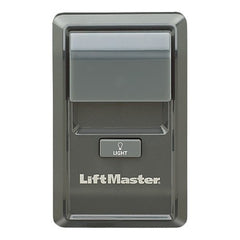
Liftmaster 885LM Security Plus 2.0 Wireless Control Panel
Availability:
Out Of Stock
- $106.50
- $106.50
- Unit price
- / per
✓
Better Price in Cart
Manufacturer pricing rules prevent us from advertising our discount — no account or email required to see it.

Secure Payments
-
Easy Returns
-
Expert Advice
-
Fast Shipping
Product Description
The LIFTMASTER 885LM is a Security Plus 2.0 wireless control panel designed for multi-door garage door and gate operator systems. It provides a wall-mounted control interface that communicates wirelessly with compatible operators, eliminating the need to run low-voltage control wiring from the panel to the motor unit. Licensed garage door technicians and security system installers use this panel in both residential and light commercial applications where a clean, wire-free installation is required. The 885LM operates on the Security Plus 2.0 encrypted rolling-code protocol, which helps prevent unauthorized code capture and replay attacks.
The 885LM is suited for installations where multiple garage doors or gate operators need to be controlled from a single centralized panel. It is commonly installed in garages with two or more bays, commercial storefronts, or properties with both a garage and a separate gate operator. The wireless design makes it a practical solution for retrofit projects where fishing new control wires through finished walls is not feasible. Each unit is sold individually and is categorized for multiple-door applications.
Key Features
- Security Plus 2.0 encrypted rolling-code wireless protocol for secure communication
- Wireless operation eliminates low-voltage wiring runs between panel and operator
- Supports multiple-door control from a single wall panel
- Wall-mounted form factor for permanent installation
- Sold as a single unit for straightforward per-door-system deployment
Compatibility
Designed for use with LIFTMASTER garage door operators and gate operators that support the Security Plus 2.0 wireless protocol. Specific compatible model numbers were not provided in the product data — verify operator compatibility against LIFTMASTER documentation before ordering.
Installation Notes
Installation is typically performed by a licensed garage door technician or low-voltage systems installer. Power down the garage door operator at the disconnect or circuit breaker before pairing or servicing the control panel. Mounting location should be chosen to maintain a clear line-of-sight or unobstructed RF path to the operator for reliable wireless signal. Follow LIFTMASTER pairing procedures exactly — do not attempt to pair the panel while the operator is in learn or diagnostic mode unless the procedure specifically calls for it.
Technical Specifications

Complete your install
We pulled together the parts most installs need for this unit, plus a few add-ons worth a look. Check what you need — nothing here blocks checkout.
Loading install accessories...
Add install kit to cart
—
Related Products
- Choosing a selection results in a full page refresh.