


Search
-
HVAC Equipment
-
Ductless Mini Splits
- Ductless Mini Splits
- Shop By Zone
- Shop by BTU
- Shop By Brand
- Components
- Accessories
-
HVAC Parts & Supplies
- HVAC Parts & Supplies
- HVAC Supplies
- HVAC Tools
-
HVAC Replacement Parts
- Blower Housing & Assemblies
- Blower Wheels
- Breakers, Contactors & Disconnects
- Capacitors & Transformers
- Control & Circuit Boards
- Filter Driers & Accumulators
- Gas Valves & Conversion Kits
- Heat Exchangers
- Thermal Expansion Valves (TXV)
- Temperature Controls
- Wall Brackets & Parts
- Miscellaneous Parts
- O-Rings & Gaskets
- Hydronics
- Motors
- Thermostats & Zoning
-
Plumbing
-
Pool
-
Electrical
-
Air Quality
-
Tools & Supplies
-
Door Security & Hardware


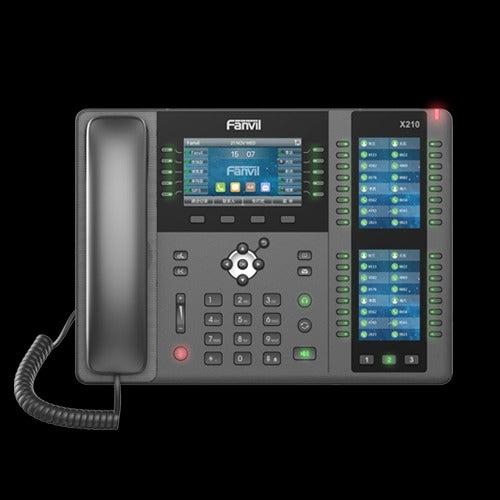
Fanvil x210i Ip Poe Paging Console 20 Sip Lines
Availability:
In Stock

Ships same day if ordered by 12 pm
- $363.39
- $363.39
- Unit price
- / per
✓
Better Price in Cart
Manufacturer pricing rules prevent us from advertising our discount — no account or email required to see it.
-
Secure Payments
-
Easy Returns
-
Expert Advice
-
Fast Shipping
Product Description
The FANVIL x210i is an enterprise-grade IP paging console phone designed for high-demand professional communications environments. It supports up to 20 SIP lines and handles three-way conferencing natively. The main display measures 4.3 inches in full color, flanked by two 3.5-inch color side displays that together support up to 106 programmable DSS keys. A dynamic gooseneck microphone is included for broadcast and intercom applications. HD audio is delivered on both the handset and the integrated speakerphone. Dual gigabit network ports with built-in Power over Ethernet eliminate the need for a separate power adapter in PoE-capable infrastructure. Built-in Bluetooth and optional WiFi via external dongle provide flexible network connectivity options. This unit is installed by network technicians and VoIP system integrators in commercial and enterprise settings.
The x210i is suited for reception desks, security monitoring stations, building management consoles, and high-call-volume enterprise deployments where multi-line visibility and rapid key access are critical. The large DSS key capacity supports direct station selection, speed dial, BLF monitoring, and intercom functions across an entire facility. The built-in mini PBX functionality allows it to operate as a standalone call-handling hub in smaller deployments without a dedicated server. It is appropriate for both new VoIP installations and upgrades from legacy analog console systems in commercial buildings, healthcare facilities, and campus environments.
Key Features
- Supports up to 20 SIP lines for high-volume multi-line call handling
- 4.3-inch color main display plus two 3.5-inch color side displays
- Up to 106 programmable DSS keys for BLF, speed dial, and intercom
- Dynamic gooseneck microphone for broadcast and intercom use
- Dual gigabit network ports with integrated Power over Ethernet (PoE)
- Built-in Bluetooth and optional WiFi via dongle
- Built-in mini PBX for standalone call management
- HD audio on handset and speakerphone
Compatibility
Designed for use with SIP-based VoIP infrastructure. Compatible with standard SIP server platforms and PoE-capable gigabit network switches. WiFi connectivity requires an optional external dongle accessory.
Installation Notes
Installation is typically performed by a licensed network technician or VoIP system integrator. Ensure the network switch port is PoE-capable before connecting, or supply power via an appropriate external adapter if PoE is not available. Configure SIP account credentials and network settings through the web-based management interface or the on-device menu before placing the unit into service. Disconnect the unit from the network before performing hardware changes such as attaching the WiFi dongle.
Technical Specifications

Complete your install
We pulled together the parts most installs need for this unit, plus a few add-ons worth a look. Check what you need — nothing here blocks checkout.
Loading install accessories...
Add install kit to cart
—
Related Products
- Choosing a selection results in a full page refresh.