


Search
-
HVAC Equipment
-
Ductless Mini Splits
- Ductless Mini Splits
- Shop By Zone
- Shop by BTU
- Shop By Brand
- Components
- Accessories
-
HVAC Parts & Supplies
- HVAC Parts & Supplies
- HVAC Supplies
- HVAC Tools
-
HVAC Replacement Parts
- Blower Housing & Assemblies
- Blower Wheels
- Breakers, Contactors & Disconnects
- Capacitors & Transformers
- Control & Circuit Boards
- Filter Driers & Accumulators
- Gas Valves & Conversion Kits
- Heat Exchangers
- Thermal Expansion Valves (TXV)
- Temperature Controls
- Wall Brackets & Parts
- Miscellaneous Parts
- O-Rings & Gaskets
- Hydronics
- Motors
- Thermostats & Zoning
-
Plumbing
-
Pool
-
Electrical
-
Air Quality
-
Tools & Supplies
-
Door Security & Hardware


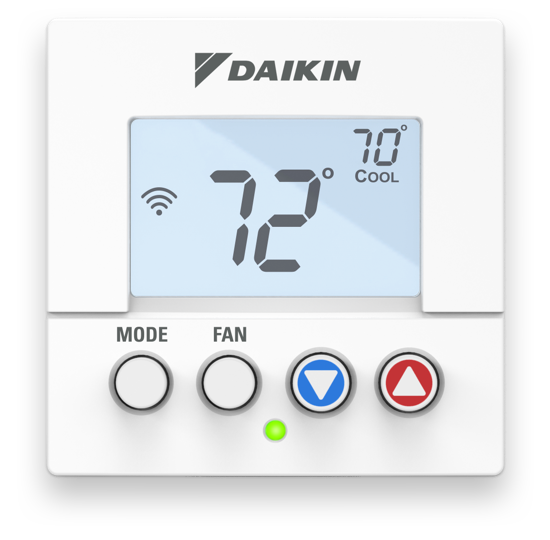
Daikin D2270C Premiun mini wifi thermostat 2h2c 7d com

Availability:
In Stock
Ships same day if ordered by 12 pm
- $198.28
- $198.28
- Unit price
- / per
✓
Better Price in Cart
Manufacturer pricing rules prevent us from advertising our discount — no account or email required to see it.
-
Secure Payments
-
Easy Returns
-
Expert Advice
-
Fast Shipping
Daikin
Thermostat
Premium Mini Wi-Fi Commercial
Explorer
Programmable
24 VAC
2 Heat/2 Cool System Configuration
3.2 in WD
3.2 in HT
Meets CULUS
FCC
FDD
UL
Thermostat
Premium Mini Wi-Fi Commercial
Explorer
Programmable
24 VAC
2 Heat/2 Cool System Configuration
3.2 in WD
3.2 in HT
Meets CULUS
FCC
FDD
UL

Complete your install
We pulled together the parts most installs need for this unit, plus a few add-ons worth a look. Check what you need — nothing here blocks checkout.
Loading install accessories...
Add install kit to cart
—
Related Products
1.0
Rated 1.0 out of 5 stars
Based on 2 reviews
0%would recommend this product
2 reviews
- AAnonymousVerified BuyerI do not recommend this productRated 1 out of 5 stars2 years agoWhat a joke
Do not buy from this company. They are a scam and have the worst customer service. They expect you to jump through so many hoops to refund something.
Was this helpful? - VWVeronika W.Verified BuyerI do not recommend this productRated 1 out of 5 stars2 years agoWorst thermostat ever
I wanted this Daikin brand because I have 2 Daikin One thermostats and wanted a simple thermostat for the spare bedroom that I could control from the same app. First surprise was that it requires a different app from the Daikin One. I thought "not what I wanted, but I guess I can live with that. Now for the installation. In order to fully install this thing you need 2 apps. The first is a "configurator app", the sole purpose of this is to hook it up to wi-fi. Then you need to set up a Skyport account and use the Skyport app to control it remotely. So far, so good. A little annoying, but ok. I wanted to set up 2 schedules, one from 9 am to 9 pm and then another from 9 pm to 9 am. First one- no problem. However, it would not let me set up anything that bridges midnight from the app. As soon as I went from a start of pm to an end time in the am, it would flip the start time to am. I could do it on the unit, but not on the app or the website. If I did it on the unit however, it then would not communicate the new schedule back to the app. Huh?? I guess I could set up 3 schedules, but it's just weird. Finally, when I manually change the temperature on the thermostat, it completely disables the schedule. My other thermostats just keep the new temp until the next schedule change. I've probably programmed 10 wifi thermostats in my life. This one is just not worth the trouble. It's going in the trash.
Was this helpful?
Loading...
Loading...
- Choosing a selection results in a full page refresh.