


Search
-
HVAC Equipment
-
Ductless Mini Splits
- Ductless Mini Splits
- Shop By Zone
- Shop by BTU
- Shop By Brand
- Components
- Accessories
-
HVAC Parts & Supplies
- HVAC Parts & Supplies
- HVAC Supplies
- HVAC Tools
-
HVAC Replacement Parts
- Blower Housing & Assemblies
- Blower Wheels
- Breakers, Contactors & Disconnects
- Capacitors & Transformers
- Control & Circuit Boards
- Filter Driers & Accumulators
- Gas Valves & Conversion Kits
- Heat Exchangers
- Thermal Expansion Valves (TXV)
- Temperature Controls
- Wall Brackets & Parts
- Miscellaneous Parts
- O-Rings & Gaskets
- Hydronics
- Motors
- Thermostats & Zoning
-
Plumbing
-
Pool
-
Electrical
-
Air Quality
-
Tools & Supplies
-
Door Security & Hardware


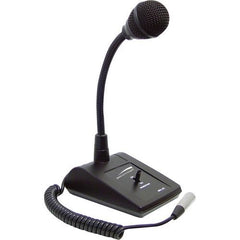
Speco mhl5s Gooseneck Desktop Microphone Xlr
Availability:
In Stock

Ships same day if ordered by 12 pm
- $129.84
- $129.84
- Unit price
- / per
✓
Better Price in Cart
Manufacturer pricing rules prevent us from advertising our discount — no account or email required to see it.
-
Secure Payments
-
Easy Returns
-
Expert Advice
-
Fast Shipping
Product Description
The SPECO mhl5s is an adjustable gooseneck tabletop microphone designed for paging, conferencing, and public address applications. It uses an omnidirectional dynamic capsule that captures clear, natural voice audio from multiple angles without requiring precise aiming. A three-position toggle switch lets the operator select push-to-talk, hold, or continuous transmission modes. The flexible gooseneck bends and stays positioned for accurate mic placement, while the sturdy metal base keeps the unit stable on any flat surface. A dual impedance selector and a standard three-pin XLR output make it straightforward to integrate into professional sound systems. Licensed audio and AV technicians are the primary installers for this type of device.
The mhl5s suits commercial, educational, and office environments where hands-free or controlled voice pickup is required. Typical install scenarios include front-desk paging systems, boardroom conferencing setups, school intercom stations, and house-of-worship sound reinforcement. The omnidirectional pickup pattern makes it practical in situations where the speaker may shift position slightly during use. The XLR output connects directly to mixing consoles, paging amplifiers, or installed sound processors without adapters.
Key Features
- Omnidirectional dynamic capsule captures voice from multiple angles
- Three-position toggle switch: push-to-talk, hold, and continuous modes
- Flexible gooseneck allows precise, hands-free positioning
- Sturdy metal base provides stable tabletop placement
- Dual impedance selector for flexible system integration
- Professional three-pin XLR output for direct connection to installed sound equipment
Compatibility
Designed as an OEM-style replacement or direct-install tabletop gooseneck microphone for professional paging, conferencing, and public address sound systems using standard three-pin XLR inputs.
Installation Notes
Installation is typically performed by a licensed AV technician or low-voltage systems integrator. Power down the paging amplifier or mixing console before connecting or disconnecting the XLR cable. Verify the impedance selector setting matches the input impedance of the receiving device before commissioning. Follow applicable local low-voltage wiring codes and the sound system manufacturer guidelines during installation.
Technical Specifications

Complete your install
We pulled together the parts most installs need for this unit, plus a few add-ons worth a look. Check what you need — nothing here blocks checkout.
Loading install accessories...
Add install kit to cart
—
Related Products
- Choosing a selection results in a full page refresh.