


Search
-
HVAC Equipment
-
Ductless Mini Splits
- Ductless Mini Splits
- Shop By Zone
- Shop by BTU
- Shop By Brand
- Components
- Accessories
-
HVAC Parts & Supplies
- HVAC Parts & Supplies
- HVAC Supplies
- HVAC Tools
-
HVAC Replacement Parts
- Blower Housing & Assemblies
- Blower Wheels
- Breakers, Contactors & Disconnects
- Capacitors & Transformers
- Control & Circuit Boards
- Filter Driers & Accumulators
- Gas Valves & Conversion Kits
- Heat Exchangers
- Thermal Expansion Valves (TXV)
- Temperature Controls
- Wall Brackets & Parts
- Miscellaneous Parts
- O-Rings & Gaskets
- Hydronics
- Motors
- Thermostats & Zoning
-
Plumbing
-
Pool
-
Electrical
-
Air Quality
-
Tools & Supplies
-
Door Security & Hardware


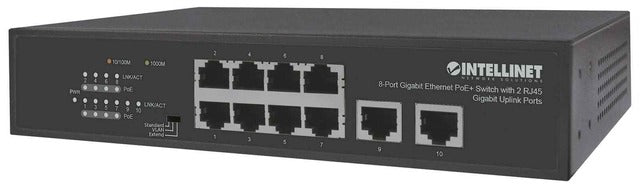
Intellinet 561402 8-port Gigabit Poe+ Switch 120W
Availability:
In Stock

Ships same day if ordered by 12 pm
- $200.61
- $200.61
- Unit price
- / per
✓
Better Price in Cart
Manufacturer pricing rules prevent us from advertising our discount — no account or email required to see it.
-
Secure Payments
-
Easy Returns
-
Expert Advice
-
Fast Shipping
Product Description
The INTELLINET 561402 is an 8-port gigabit Ethernet PoE+ switch with a 120-watt total PoE power budget and two additional RJ45 gigabit uplink ports. It delivers both data and electrical power over standard Cat5e or Cat6 network cables to PoE-compatible devices including wireless access points, VoIP phones, and IP cameras. Each of the eight ports supports 10/100/1000 Mbps auto-sensing and can supply up to 32 watts per port under IEEE 802.3at. The switch also supports a manual PoE extend mode that reduces link speed to extend PoE reach to 250 meters. Licensed electricians and network technicians are the primary installers for this type of equipment.
This switch is suited for small commercial and light enterprise deployments where running separate power drops to endpoint devices is impractical. Typical applications include mounting wireless access points on ceilings, powering IP security cameras in hallways, and connecting VoIP phones at desks — all without additional power supplies or adapters at each device. The manual VLAN mode allows ports 1 through 8 to be logically isolated from one another, which is useful in multi-tenant or segmented network environments. The unit supports any mix of IEEE 802.3af and IEEE 802.3at devices on the same switch.
Key Features
- 120-watt total PoE power budget across all 8 PoE ports
- Up to 32 watts per port (IEEE 802.3at); also backward-compatible with IEEE 802.3af devices
- Manual PoE extend mode stretches PoE support to 250 meters at reduced network speed
- Manual VLAN mode isolates ports 1 through 8 from each other
- IEEE 802.3az Energy Efficient Ethernet deactivates unused ports and adjusts power based on cable length
- Built-in short-circuit, overload, and high-voltage protection on all PoE ports
- Store-and-forward switching with IEEE 802.3x full-duplex flow control and support for up to 8,192 MAC address entries
Compatibility
Compatible with IEEE 802.3at and IEEE 802.3af PoE-compliant devices including wireless LAN access points, VoIP phones, and IP video cameras. Non-compliant legacy devices require a separate PoE splitter for powered operation.
Installation Notes
Installation is typically performed by a qualified network technician or licensed low-voltage contractor. Power down the switch and all connected devices before making or changing cable connections. Verify the total PoE draw of all connected devices does not exceed the 120-watt system budget before commissioning. Follow applicable local electrical codes and TIA-568 structured cabling standards when routing network cables.
Technical Specifications

Complete your install
We pulled together the parts most installs need for this unit, plus a few add-ons worth a look. Check what you need — nothing here blocks checkout.
Loading install accessories...
Add install kit to cart
—
Related Products
- Choosing a selection results in a full page refresh.