


Search
-
HVAC Equipment
-
Ductless Mini Splits
- Ductless Mini Splits
- Shop By Zone
- Shop by BTU
- Shop By Brand
- Components
- Accessories
-
HVAC Parts & Supplies
- HVAC Parts & Supplies
- HVAC Supplies
- HVAC Tools
-
HVAC Replacement Parts
- Blower Housing & Assemblies
- Blower Wheels
- Breakers, Contactors & Disconnects
- Capacitors & Transformers
- Control & Circuit Boards
- Filter Driers & Accumulators
- Gas Valves & Conversion Kits
- Heat Exchangers
- Thermal Expansion Valves (TXV)
- Temperature Controls
- Wall Brackets & Parts
- Miscellaneous Parts
- O-Rings & Gaskets
- Hydronics
- Motors
- Thermostats & Zoning
-
Plumbing
-
Pool
-
Electrical
-
Air Quality
-
Tools & Supplies
-
Door Security & Hardware


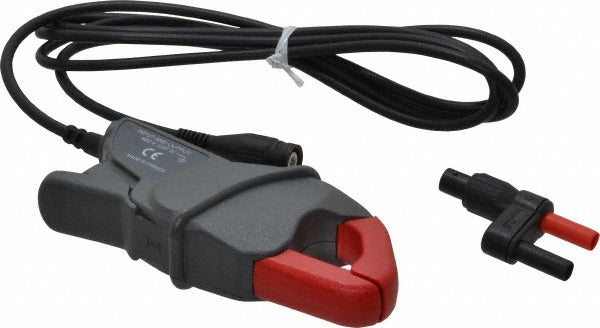
Fluke I200S Ac Current Clamp for Multimeter

Availability:
In Stock
Ships same day if ordered by 12 pm
- $435.95
- $435.95
- Unit price
- / per
✓
Better Price in Cart
Manufacturer pricing rules prevent us from advertising our discount — no account or email required to see it.
-
Secure Payments
-
Easy Returns
-
Expert Advice
-
Fast Shipping
Product Description
The FLUKE I200S is an AC current clamp accessory designed for use with compatible test and measurement instruments. It connects to digital multimeters, power quality meters, and scope meters to extend their current-measurement capability without requiring direct circuit contact. The clamp jaw surrounds a conductor and outputs a proportional signal to the connected instrument, allowing safe, non-intrusive current readings. It is finished in black and red. Licensed electricians, industrial maintenance technicians, and field service professionals typically use this accessory as part of a broader electrical diagnostic toolkit.
The I200S is suited for both residential and commercial electrical work where non-contact AC current measurement is required. Typical applications include load testing, troubleshooting branch circuits, verifying motor draw, and auditing electrical panel performance. It is paired with a host instrument rather than used as a standalone device, making it a practical add-on for technicians who already carry compatible FLUKE meters in their kit.
Key Features
- Clamp-style jaw design allows non-intrusive AC current measurement around a single conductor
- Compatible with digital multimeters, power quality meters, and scope meters
- Black and red color scheme consistent with standard FLUKE accessory identification
- Packaged as a single unit, suitable for individual replacement or initial purchase
Compatibility
Designed for use with digital multimeters, power quality meters, and scope meters. Confirm connector and input-range compatibility with the specific host instrument before use. No additional model-specific compatibility data was provided in the product information.
Installation Notes
Installation and use of this clamp accessory should be performed by a qualified electrician or instrumentation technician familiar with NEC safety practices. De-energize and verify circuits are safe before connecting or disconnecting accessory leads where possible, and follow all applicable lockout/tagout procedures. The clamp jaw must be fully closed around a single conductor only — do not clamp around multiple conductors or bundled cables simultaneously, as this will produce inaccurate readings. Refer to the host instrument manual for proper input terminal selection and measurement range configuration.
Technical Specifications

Complete your install
We pulled together the parts most installs need for this unit, plus a few add-ons worth a look. Check what you need — nothing here blocks checkout.
Loading install accessories...
Add install kit to cart
—
Related Products
- Choosing a selection results in a full page refresh.