


Search
-
HVAC Equipment
-
Ductless Mini Splits
- Ductless Mini Splits
- Shop By Zone
- Shop by BTU
- Shop By Brand
- Components
- Accessories
-
HVAC Parts & Supplies
- HVAC Parts & Supplies
- HVAC Supplies
- HVAC Tools
-
HVAC Replacement Parts
- Blower Housing & Assemblies
- Blower Wheels
- Breakers, Contactors & Disconnects
- Capacitors & Transformers
- Control & Circuit Boards
- Filter Driers & Accumulators
- Gas Valves & Conversion Kits
- Heat Exchangers
- Thermal Expansion Valves (TXV)
- Temperature Controls
- Wall Brackets & Parts
- Miscellaneous Parts
- O-Rings & Gaskets
- Hydronics
- Motors
- Thermostats & Zoning
-
Plumbing
-
Pool
-
Electrical
-
Air Quality
-
Tools & Supplies
-
Door Security & Hardware


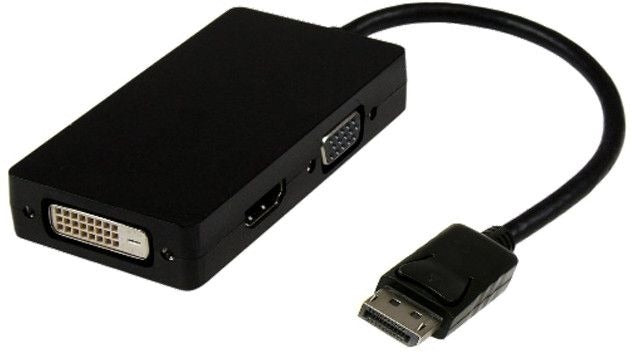
Calrad 35-740 Displayport to Hdmi Dvi Vga Adapter
Availability:
In Stock

Ships same day if ordered by 12 pm
- $49.32
- $49.32
- Unit price
- / per
✓
Better Price in Cart
Manufacturer pricing rules prevent us from advertising our discount — no account or email required to see it.
-
Secure Payments
-
Easy Returns
-
Expert Advice
-
Fast Shipping
Product Description
The CALRAD 35-740 is a 3-in-1 DisplayPort adapter that converts a DisplayPort video output to HDMI, DVI, or VGA. It is designed for laptops and desktop computers equipped with a DisplayPort output jack. The adapter supports video resolutions up to 1920x1200 and 1080p full HD, allowing a clean signal conversion without degrading video quality. Compatible with Intel Thunderbolt when connected directly to a Thunderbolt I/O port that supports DisplayPort signaling, the 35-740 handles automatic display detection on connection. A/V installers, IT technicians, and experienced DIYers install this adapter when connecting a DisplayPort source to a legacy or mixed-input display.
This adapter is suited for residential and commercial environments where a single DisplayPort source needs to drive one of three common display interfaces. Typical applications include mirroring or extending a desktop workstation, connecting a laptop to a conference room projector or monitor, or routing video from a computer to an HDTV. The adapter supports only one output at a time; display type is detected automatically when the cable is plugged in. It is appropriate for office presentations, home theater setups, and multi-monitor workstation configurations where the display accepts HDMI, DVI, or VGA input.
Key Features
- Converts DisplayPort output to HDMI, DVI, or VGA with a single adapter
- Supports video resolutions up to 1920x1200 and 1080p full HD
- Automatic display detection on plug-in, no manual switching required
- Compatible with Intel Thunderbolt over DisplayPort I/O ports
- One active output at a time, selected by which cable is connected
Compatibility
Compatible with laptops and desktop computers equipped with a DisplayPort output jack. Also compatible with Intel Thunderbolt ports that support DisplayPort signaling when connected directly to the Thunderbolt I/O port.
Installation Notes
This adapter is installed by A/V technicians and IT professionals and requires no tools beyond the adapter itself. Power down or sleep the source device before connecting display cables to avoid signal detection issues on certain systems. Connect only one display output cable at a time, as the adapter does not support simultaneous multi-output operation. Verify the target display accepts the chosen signal type (HDMI, DVI, or VGA) before installation.
Technical Specifications

Complete your install
We pulled together the parts most installs need for this unit, plus a few add-ons worth a look. Check what you need — nothing here blocks checkout.
Loading install accessories...
Add install kit to cart
—
Related Products
- Choosing a selection results in a full page refresh.